Today's eSchool News had an interesting article regarding upcoming web 2.0 tools that will impact the educational community. The article breaks up the emerging technology in several categories, based on the type of technology and the timeframe for widespread integration.
I encourage you to read the entire article, and I plan to dedicate future entries to some of the individual tools discussed.
The first categories discussed include Collaborative Environments, like Moodle or Ning, and VoiceThread and Online Communication tools, including twitter, skype, and edmodo . It is believed that these tools will be widely used within the next year or two. I have seen a number of these tools used in education already, while others are still not being widely utilized because of concern regarding possible liability. It will be interesting to see how these tools become incorporated. In the spirit of encouraging 21st century skills, I believe these are valuable tools and with proper guidance should be utilized to enhance instruction.
The next categories, which are projected to be widely used in the next two to three years include mobile devices and cloud computing.
The article states...
"The combination of available applications and a device that [students] can carry provides an opportunity to introduce students to tools for study and time management that will help them later in life," says the report. "The implications for K-12 education are dramatic: the potential for mobile gaming and simulation, research aids, field work, and tools for learning of all kinds is there, awaiting development."
It is amazing what is available on a phone these days. Phones have become people's communication devices far beyond the simple telephone functionality. People can gather all of their email and messaging on a mobile device, manage their appointments (wouldn't it be great for all students to use a digital management system for assignments, etc). In addition, a smart phone or mobile device can be used to store and analyze data, research online, view photos and video, etc. Currently, we have many rules in place regarding the use of cell phones in school, whereby students are not allowed to have them on in at all during the school day (if even allowed to be carried). At some point, the mindset will have to change, but with proper guidelines. As a tool, including the available applications that are available, mobile phones and other wireless devices will become an incredible teaching and learning tool. What better way to teach, then by encouraging the technology that children are using in the real world.
The concept of cloud computing refers to applications that are hosted remotely including google documents and other collaborative writing tools in addition to a variety of other applications like YouTube where the content is hosted remotely.
The final categories (3 to 4 years out) include smart objects and The Personal Web. Smart objects include items that can be coded and tracked. The peronal web speaks of the notion of using tools to organize content on the web, rather than just view it. This will certainly provide the opportunity for students to learn more sophisticated means of researching, managing, and effecively utilizing information over time.
It is interesting to see how many of these ideas are already being utilized. At this point, they are being utilized sporadically and generally by educators who have dedicated the effort to learn these tools on their own. In time, utilization of these tools will be more common and integrated in the curriculum. Exciting stuff :)
Thursday, March 26, 2009


Monday, March 16, 2009
Can't see video when playing a DVD with your Tablet?
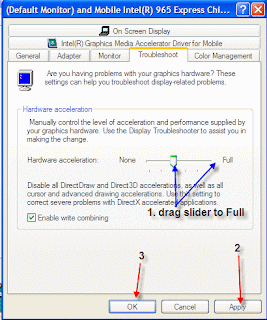
I have received a number of inquiries recently regarding video issues with the Lenovo Tablet PCs. Essentially, people are having issues viewing a DVD on the Tablet. Generally speaking, sound is working, but the display is not. The issue is occurring because the video card is not equipped for certain graphic capabilities. This can be fixed by setting the hardware acceleration higher on the display settings. Following are the necessary steps.
 Step 1:
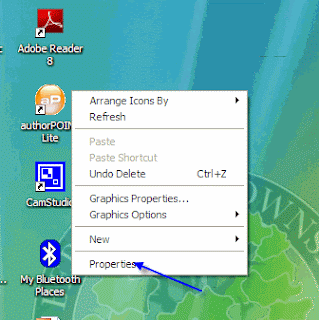
right click on a blank area on the desktop (not on an icon) and choose 'Properties"
Step 2:
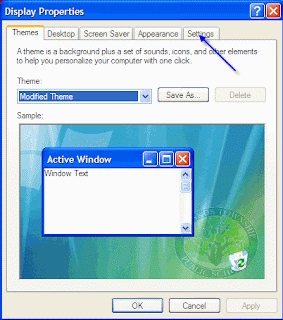
When in the Display Properties, click on the Settings Tab.
Step 3:
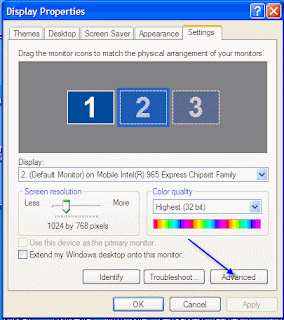
Click the 'Advanced Button' at the bottom of the Settings Page.
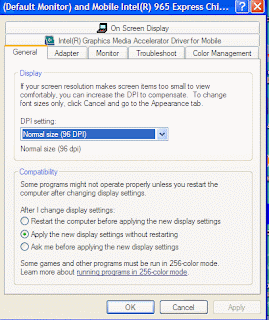
Step 4: Click on the Troubleshoot Tab on the Advanced Page
=
Step 5:
In the 'Troubleshoot' Tab, click the and drag the slider for hardware acceleration from the present location to 'Full'. Then click Apply and OK and you are done. Your DVD should play, video and all.
Note: This also works for some other graphic issues on the tablet. If you are using GameMaker, this will be required in order to run the games once created.
 Step 1:
right click on a blank area on the desktop (not on an icon) and choose 'Properties"

Step 2:
When in the Display Properties, click on the Settings Tab.

Step 3:
Click the 'Advanced Button' at the bottom of the Settings Page.

Step 4: Click on the Troubleshoot Tab on the Advanced Page
=

Step 5:
In the 'Troubleshoot' Tab, click the and drag the slider for hardware acceleration from the present location to 'Full'. Then click Apply and OK and you are done. Your DVD should play, video and all.
Note: This also works for some other graphic issues on the tablet. If you are using GameMaker, this will be required in order to run the games once created.
Tuesday, March 10, 2009
Classwish.org
This seemed like a timely post in light of our current budget crisis...

Classwish is a nonprofit organization that makes it easy for teachers ans schools to create Wish Lists of the supplies they need for students to excel. Parents and others in the community see exactly what is needed and contribute online.
Visit classwish.org and set up a teacher profile and wish list today!

Classwish is a nonprofit organization that makes it easy for teachers ans schools to create Wish Lists of the supplies they need for students to excel. Parents and others in the community see exactly what is needed and contribute online.
Visit classwish.org and set up a teacher profile and wish list today!
Monday, March 9, 2009
How to Embed a YouTube Video in your PowerPoint presentation
This tutorial will show you how to embed a video from YouTube right in a PowerPoint presentation. The method in the video is intended for use in PowerPoint 2003, but should work in PowerPoint 2000 as well. If you are using PowerPoint 2007, do a search on YouTube as there are many videos for 2007. The video is also assuming you are online and can access the video from the YouTube server. If you need to use the video offline, there are additional steps required, which make the process a little more complicated. My students have been using this method to include video in their PowerPoint and have had great success. Hopefully, this will work for you!
Thursday, February 26, 2009
Blogs in Plain English
You are reading my blog, so I guess you have some concept of what a blog is. This video breaks down the idea of blogging and will hopefully inspire you to create your own blog about a topic that speaks to you. Enjoy!
Help! I can't open that file at school...
My wife, Cathy Cheo-Isaacs posted an entry in her blog that addresses the age old issue of incompatibility regarding versions of Microsoft Office. I am continually asked to open files for students because they completed them at home using a different version of Office. For example, they may have Office 2007 at home, and our computers have Office 2000 or 2003. Whatever the case may be, Cathy provides the answer with a link to the Microsoft compatibility pack.
Visit her entry here.
Visit her entry here.
Friday, February 13, 2009
GameMaker - Free Game Development Program
 GameMaker is a wonderful drag and drop gamemaking tool. It is easy enough for elementary students to use to create games and robust enough for the hard core programmer. I have used this to teach programming concepts and constructs with students from grade 2 through 10. I am continually amazed by the creations of my students and the countless hours they put into creating their games. The toolset is openended and provides the game designer with the opportunity to create any type of game they can think of without limitation.
 GameMaker is supported by an online community called yoyogames (http://www.yoyogames.com/). The site allows you to download a plethora of resources. The program is available for free and an additional set of tools can be unlocked by purchasing the Pro version at a nominal fee. The pro version is not necessary, but for the small donation it is certainly worth supporting the development team. You can also download resources including tutorials, graphics, sounds, etc. Finally, you can post your games to the yoyogames site for others to enjoy or download games created by others.
Subscribe to:
Posts (Atom)